Camera Interface
SHC3’s interface is built around the viewfinder — all core operations can be performed directly on the shooting screen.
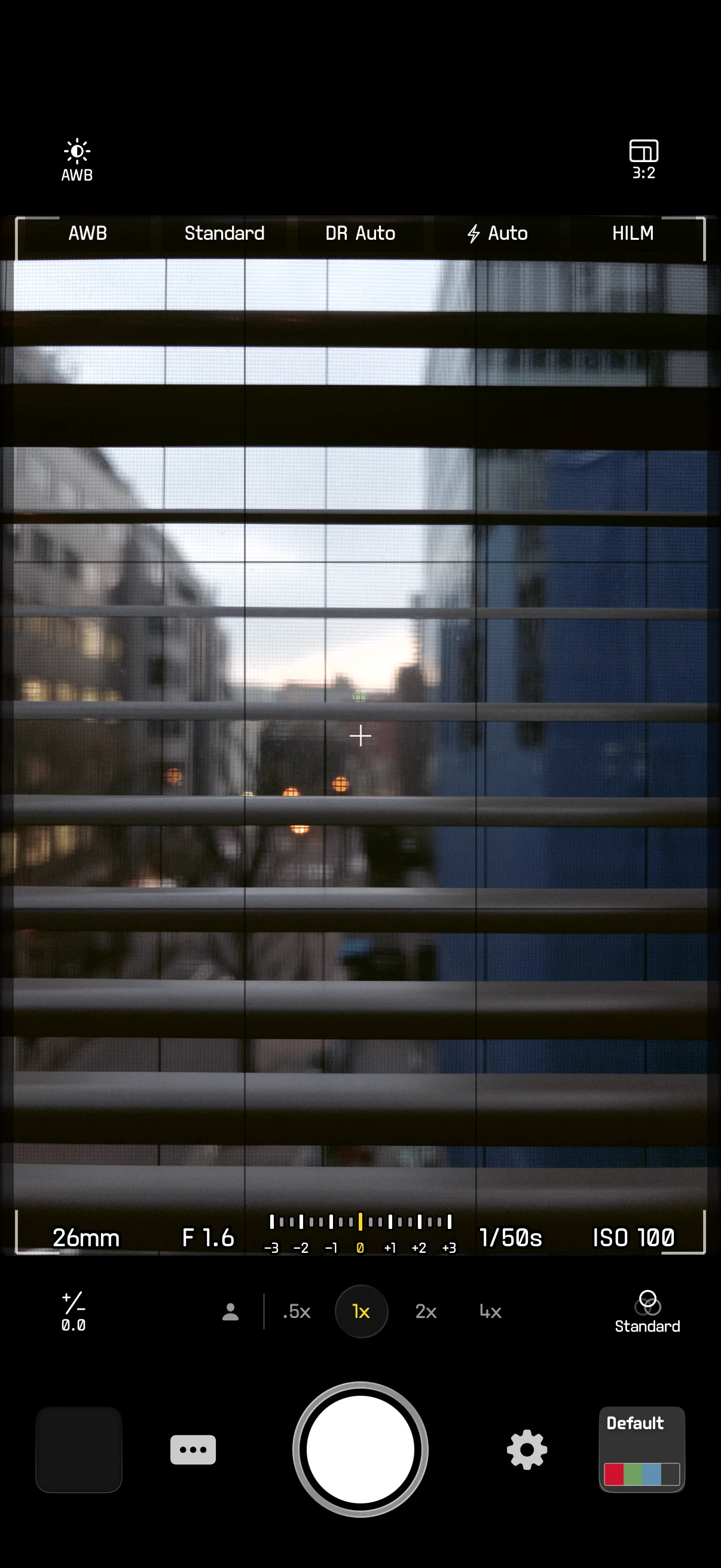
Viewfinder Layout
The viewfinder occupies the main area of the screen, displaying the live camera feed. UI elements are arranged around the viewfinder:
- Top info bar: Displays current shooting parameters
- Bottom exposure bar: Shows exposure-related data
- Corner arc controls: Quick adjustment of commonly used parameters
- Center quick cross menu: A swipe-activated parameter selector
Top Info Bar
The top info bar displays key shooting settings:
- White balance: Auto / AWB-A / Preset / Custom
- Color preset: Name of the currently selected Color preset
- DR mode: Dynamic Range setting (shown only in RAW pipeline)
- Flash mode: Auto / On / Off
- Capture format: HEIC / HILM / HEIC+ / RAW+ (a
+Livesuffix is appended when Live Photo is on)
Tap any item to open its settings menu.
Exposure Info Bar
Located at the bottom of the viewfinder, it shows real-time exposure data:
- Focal length: 35mm equivalent focal length or magnification, depending on the display mode setting
- Aperture: Current aperture value (e.g., F 1.6)
- EV scale: Exposure compensation indicator from -3 to +3 in 1/3 EV steps
- Shutter speed: Current shutter speed (e.g., 1/30s)
- ISO: Current sensitivity (e.g., ISO 100)
Histogram
The histogram displays the luminance distribution of the image and is located in the upper-left corner of the viewfinder.
Enable or disable it in Settings > Viewfinder > Histogram.
Level
The level indicator helps keep the frame horizontal.
Set the display mode in Settings > Viewfinder > Level: Off / Center / Bottom. Enable pitch display in Settings > Viewfinder > Pitch to show the forward/backward tilt angle.
Grid
A 3×3 rule-of-thirds grid overlays the viewfinder to assist with composition.
Enable or disable it in Settings > Viewfinder > Grid.
Focus Indicator
Tap anywhere on the viewfinder to focus:
- Yellow box: Focusing in progress
- Green box: Focus confirmed
After focus is acquired, drag vertically on the focus box to adjust local exposure. Long-press the viewfinder for about 1 second to lock AE/AF — an AE/AF LOCK label will appear above the focus box.
Arc Controls
Each corner of the screen has an arc control — the core interaction method in SHC3.
Corner Assignment
Default assignment:
| Corner | Default Function |
|---|---|
| Top-left | White Balance |
| Top-right | Aspect Ratio |
| Bottom-left | Exposure |
| Bottom-right | Color |
Customize each corner’s function in Settings > Customize Controls.
Gestures
- Press and drag: Press and hold a corner icon, then drag up/down/left/right to adjust the parameter value; drag to the outer ring to slide along the arc track for direct adjustment
When an arc is expanded, context buttons appear on the opposite side, providing related shortcuts (e.g., WB shift editor, jump to settings, etc.).
Assignable Functions
The following functions can be assigned to any corner:
| Function | Arc Mode | Description |
|---|---|---|
| Recipe | Infinite discrete | Scroll through Recipes (favorites if set) |
| Exposure (EV) | Range | -3 to +3, 1/3 steps |
| Color | Infinite discrete | Scroll through Color presets (favorites if set) |
| Dynamic Range (DR) | Discrete | Off / Auto / 100% / 200% / 400% |
| White Balance (WB) | Discrete | Auto / AWB-A / Presets / Custom |
| Aspect Ratio | Discrete | Enabled ratio options |
| Flash | Discrete | Auto / On / Off |
| Capture Format | Discrete | HEIC / HILM / HEIC+ / RAW+ |
| None | — | Leave empty |
Quick Cross Menu
A wheel-style parameter selector at the center of the viewfinder for quickly switching shooting parameters.
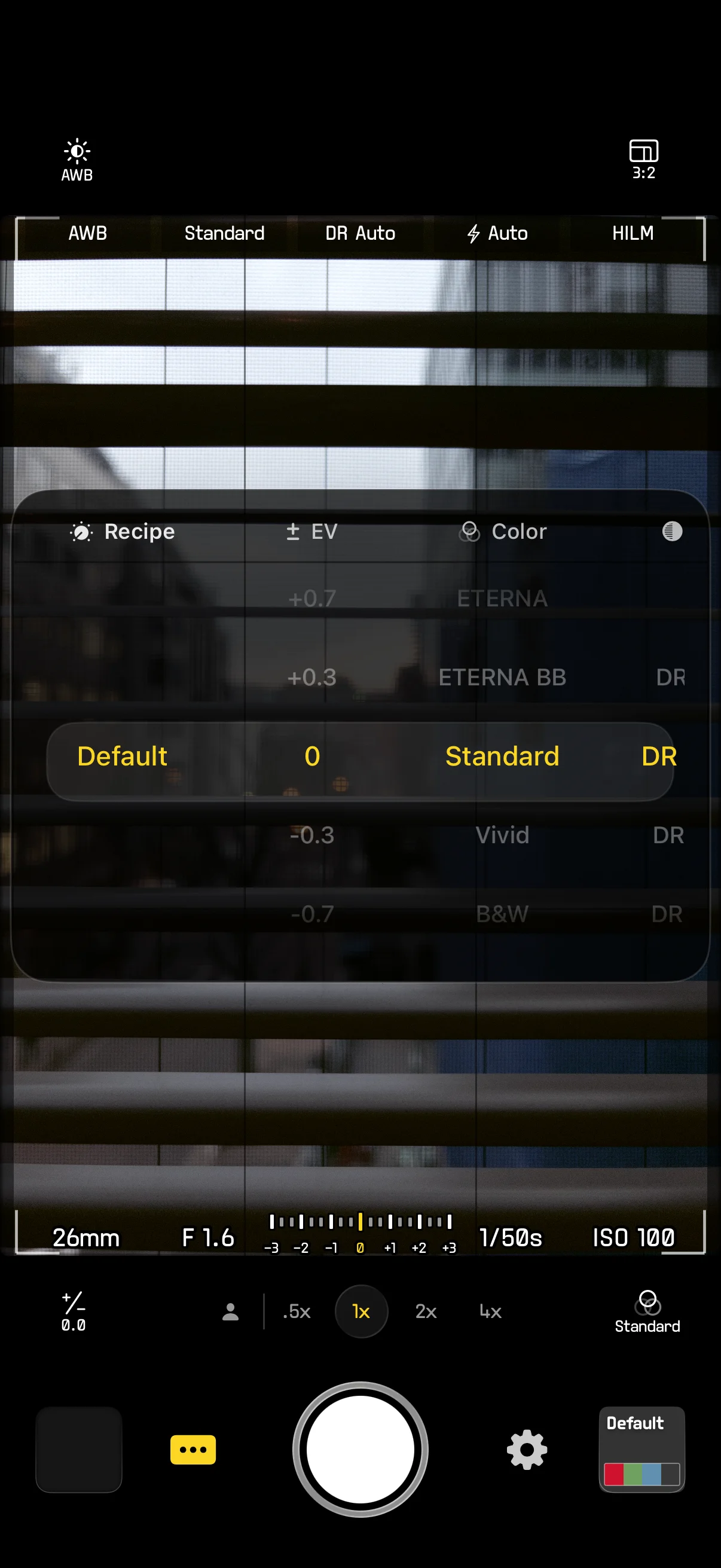
Parameter Groups
Swipe horizontally to switch between parameter groups; scroll vertically to select a value within a group:
- Recipe
- Exposure (EV)
- Color
- Dynamic Range (DR)
- White Balance (WB)
- Aspect Ratio
- Flash
- Capture Format
The currently selected value is highlighted in the center. Modified parameter groups are marked with a yellow dot.
Customization
In Settings > Quick Menu you can:
- Reorder parameter groups
- Enable or disable specific parameter groups
Tapping the viewfinder, dragging an arc control, pressing the shutter, or switching zoom will automatically dismiss the Quick Cross Menu.